nginx 配置流程
基础配置
user www-data;  # Nginx 工作进程运行的用户
worker_processes auto;  # 工作进程数量,auto 表示自动根据 CPU 核心数设置
pid /run/nginx.pid; # 指定存储主进程 ID 的文件位置
error_log /var/log/nginx/error.log; #  错误日志文件路径
include /etc/nginx/modules-enabled/*.conf; #  加载启用的模块配置文件

events {
	worker_connections 768; # 每个工作进程的最大连接数
	# multi_accept on;  # 是否允许一个工作进程同时接受多个新连接
}

http {

	##
	# Basic Settings
	##

	sendfile on;    # 启用高效文件传输模式
	tcp_nopush on;  # 仅在 sendfile 启用时有效,优化数据包发送
	types_hash_max_size 2048;   # MIME 类型哈希表的最大大小
	# server_tokens off;

	# server_names_hash_bucket_size 64;
	# server_name_in_redirect off;

	include /etc/nginx/mime.types;  # 包含 MIME 类型定义文件
	default_type application/octet-stream;  # 默认 MIME 类型

	##
	# SSL Settings
	##

	ssl_protocols TLSv1 TLSv1.1 TLSv1.2 TLSv1.3; # 启用的 SSL/TLS 协议版本 Dropping SSLv3, ref: POODLE
	ssl_prefer_server_ciphers on;   # 优先使用服务器端的加密套件

	##
	# Logging Settings
	##

	access_log /var/log/nginx/access.log;   # 访问日志文件路径

	##
	# Gzip Settings
	##

	gzip on;

	# gzip_vary on;
	# gzip_proxied any;
	# gzip_comp_level 6;
	# gzip_buffers 16 8k;
	# gzip_http_version 1.1;
	# gzip_types text/plain text/css application/json application/javascript text/xml application/xml application/xml+rss text/javascript;

	##
	# Virtual Host Configs
    # 虚拟主机配置
	##

	include /etc/nginx/conf.d/*.conf;
	include /etc/nginx/sites-enabled/*;
}
配置方式:
这个配置文件是安装完后自带的,配置的都是一些基础通用的内容,一般不在这个文件中进行配置修改.
注意配置文件末尾的
include内容:
include /etc/nginx/conf.d/*.conf; include /etc/nginx/sites-enabled/*;这两行配置意思是导入
conf.d文件夹下的所.conf配置文件,导sites-enabled文件夹下的所有文件,当然这里的文件内容肯定是nginx的配置内容
Nginx目录
在进行配置之前我们先看一下需要关注的目录
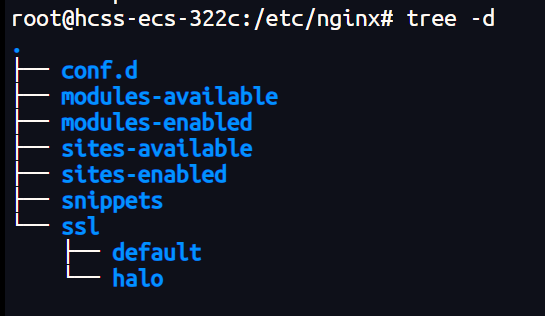
这里我们先关sites-available sites-enable 两个文件夹,这两个文件夹是什么可以从这篇文章来了解 :
总之,可以简单的认为available 文件夹存储网站的配置文件 , enabled 文件夹控制配置是否生效
这样的话,我们的配置文件就应该available 文件夹下面. 由于基础配置里面include /etc/nginx/sites-enabled/*; 这行配置的存在,我们available 文件夹下的配置内容会被引入到基础配置中http 块中,所以可以忽略基础配置直接写站点对应的配置. (available 和 enabled 关系混乱的话先看一下上面提及的文章捋一下)
站点配置
找available 目录下,我的发行版贴心的准备了一default 配置模板文件
##
# You should look at the following URL's in order to grasp a solid understanding
# of Nginx configuration files in order to fully unleash the power of Nginx.
# https://www.nginx.com/resources/wiki/start/
# https://www.nginx.com/resources/wiki/start/topics/tutorials/config_pitfalls/
# https://wiki.debian.org/Nginx/DirectoryStructure
#
# In most cases, administrators will remove this file from sites-enabled/ and
# leave it as reference inside of sites-available where it will continue to be
# updated by the nginx packaging team.
#
# This file will automatically load configuration files provided by other
# applications, such as Drupal or Wordpress. These applications will be made
# available underneath a path with that package name, such as /drupal8.
#
# Please see /usr/share/doc/nginx-doc/examples/ for more detailed examples.
##

# Default server configuration
#
server {
	listen 80 default_server;
	listen [::]:80 default_server;

	# SSL configuration
	#
	# listen 443 ssl default_server;
	# listen [::]:443 ssl default_server;
	#
	# Note: You should disable gzip for SSL traffic.
	# See: https://bugs.debian.org/773332
	#
	# Read up on ssl_ciphers to ensure a secure configuration.
	# See: https://bugs.debian.org/765782
	#
	# Self signed certs generated by the ssl-cert package
	# Don't use them in a production server!
	#
	# include snippets/snakeoil.conf;

	root /var/www/html;

	# Add index.php to the list if you are using PHP
	index index.html index.htm index.nginx-debian.html;

	server_name _;

	location / {
		# First attempt to serve request as file, then
		# as directory, then fall back to displaying a 404.
		try_files $uri $uri/ =404;
	}

	# pass PHP scripts to FastCGI server
	#
	#location ~ \.php$ {
	#	include snippets/fastcgi-php.conf;
	#
	#	# With php-fpm (or other unix sockets):
	#	fastcgi_pass unix:/run/php/php7.4-fpm.sock;
	#	# With php-cgi (or other tcp sockets):
	#	fastcgi_pass 127.0.0.1:9000;
	#}

	# deny access to .htaccess files, if Apache's document root
	# concurs with nginx's one
	#
	#location ~ /\.ht {
	#	deny all;
	#}
}


# Virtual Host configuration for example.com
#
# You can move that to a different file under sites-available/ and symlink that
# to sites-enabled/ to enable it.
#
#server {
#	listen 80;
#	listen [::]:80;
#
#	server_name example.com;
#
#	root /var/www/example.com;
#	index index.html;
#
#	location / {
#		try_files $uri $uri/ =404;
#	}
#}
先不管注释掉的内容,从有效配置来看,这个文件告诉我们,这里的配置中只需要写 server 块就可以了
# HTTP重定向到HTTPS
server {
    listen 80;
    listen [::]:80;
    server_name example.com www.example.com;
    return 301 https://$host$request_uri;
}
# HTTPS
server {
    listen 443 ssl http2;
    listen [::]:443 ssl http2;

    server_name example.com www.example.com;

    # 证书配置
    ssl_certificate your-path;
    ssl_certificate_key your-path;


    # 网站根目录
    root /var/www/default;
    index index.html;

    # 内容处理
    location / {
        try_files $uri $uri/ =404;

        # 禁止iframe嵌入(可选)
        add_header Content-Security-Policy "frame-ancestors 'self'";
    }

    # 静态资源缓存
    location ~* \.(js|css|png|jpg|jpeg|gif|ico|svg|woff2)$ {
        expires 365d;
        add_header Cache-Control "public, immutable";
    }

    # 禁止访问隐藏文件
    location ~ /\.(?!well-known) {
        deny all;
        access_log off;
        log_not_found off;
    }

    # 错误页面
    error_page 404 /404.html;
    location = /404.html {
        internal;
    }

    # 日志配置
    access_log your-log-path;
    error_log  your-log-path;
站点配置启用
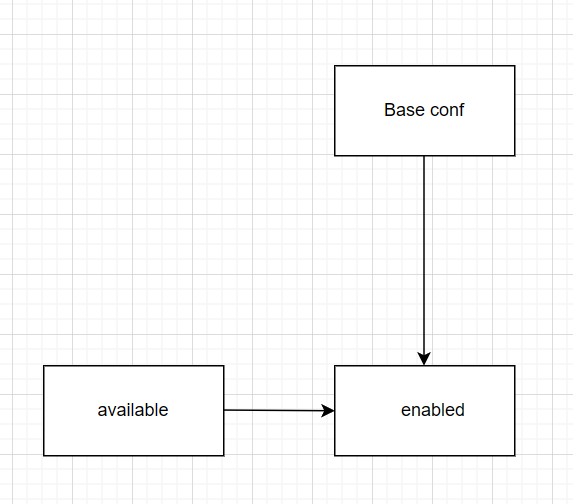
前面说了, available 控制具体配置, enabled 控制配置是否启用. 配置完成以后创立软连接到enabled 文件夹下就可以生效了.
我们再来捋一下这中间的关系:
基本配置里面引用了 enabled 下的内容
enabled 中的内容是 available 中的软连接
available 中是具体的配置文件
使配置生效
# 检测配置文件
sudo nginx -t
# 重载Nginx配置
sudo nginx -s reload